Designing for Impact: An Interview with Dr Valentina Aparicio
/filters:format(webp)/prod01/channel_389/technology-enhanced-learning-team/media/telt/images/Valentina-.jpg)
Dr Valentina Aparicio
It was a pleasure to speak with Dr Valentina Aparicio from Queen Mary Academy (QMA) about QMA7001 - Learning and Teaching in Higher Education - 2025/26
The QMplus site for this module had already been recommended to me by several colleagues as an excellent example of thoughtful and effective course design. After exploring it myself, I was equally impressed by its clarity, structure, and the effective use of TELT-supported tools, including Padlet ( Please explore TELT guidance on Padlet: Course: Mentimeter & Padlet Guidance for Users | MyQMUL).
Keen to learn more about the approach behind this work, I spoke with Valentina, who kindly agreed to share her experience for the TELT website and newsletter.
Designing the module
What was your main goal when designing the module?
Valentina explained that many participants on the PGCAP are new to the university and unfamiliar with QMplus. Because of this, her main goal was to make the module page as intuitive as possible.
She focused on creating a clear and orderly structure. Each week follows the same format, with consistent sections and titles, helping participants become familiar with the layout without encountering something new each time. This approach also provides a strong example of what an effective QMplus page can look like, while encouraging engagement with the resources.
Making it easy to use
How did you ensure the module is easy for students to use?
Consistency was key. Each week is structured in the same way, allowing users to quickly understand how to navigate the module.
Valentina also followed TELT guidance on using tabs and sections, attended Brickfields support sessions, and ensured the content met accessibility requirements. A conscious effort was made not to overload the page, keeping it clean and manageable.
The student experience
What kind of experience did you want students to have?
Valentina wanted the module to be visually appealing, simple, and easy to navigate. It needed to work well on different devices, including phones and tablets, allowing students to access content quickly without having to search for it.
The aim was to create an attractive, user-friendly environment that supports efficient learning.
Accessibility and support
Was the Brickfields training helpful?
Valentina found the Brickfields training extremely valuable. It introduced practical accessibility considerations she had not previously been aware of, such as how to name links clearly and avoid unnecessary new tabs.
She strongly recommends the training to others looking to improve accessibility in their QMplus modules.
Learn more about Brickfields on the TELT QMplus site.
Learning from student feedback
Did student feedback shape the design?
Student feedback played an important role in refining the module.
For example, adding dates to each weekly section helped students keep track of where they were in the module, particularly as the same QMplus space was used for multiple groups.
Students also requested fewer embedded resources. In response, Valentina moved content such as videos and Padlets into separate pages. This reduced page load times and prevented students from feeling overwhelmed by too much content displayed at once.
Using tools effectively
Which tools worked well?
Forums have been especially effective. They are used to check understanding, encourage discussion, and gather insights before sessions. For instance, students may complete a reading and respond to a question before a class, allowing Valentina to gauge their thinking in advance.
H5P is used more sparingly but serves as a useful way to showcase what is possible within QMplus. Many participants have been surprised by the range of tools available.
Learn more about H5P on TELT QMplus site Course: H5P Guidance for Staff | MyQMUL
Balancing interaction and content
How did you decide which activities should be interactive?
The module uses a flipped learning approach, with pre-session work, live webinars, and post-session activities.
Valentina emphasised the importance of cognitive engagement. Even when content is more passive, there is usually an interactive element, such as a question, forum, or Padlet activity. This ensures students are actively engaging with the material rather than simply receiving information.
What worked well – and what didn’t
Valentina noted that forums initially did not work as intended. Students often forgot to contribute or posted too late to be useful.
Introducing deadlines significantly improved participation. With deadlines visible in QMplus, students were more likely to complete tasks on time. This simple change made a noticeable difference and is something she would strongly recommend.
Supporting student learning
How does the structure support learning?
The consistent structure—pre-session work, live webinar, and follow-up activities—helps students understand what they need to do and when. This clarity supports both engagement and progression through the module.
Challenges
What were the main challenges?
The most significant challenge has been maintaining and updating the module. This includes keeping dates current, ensuring links work, and updating deadlines.
Valentina noted that creating a high-quality QMplus site is time-consuming, but the effort is worthwhile once it is established.
What worked particularly well
Valentina highlighted two features she was especially pleased with:
- Completion tracking: Once set up, it allows students to clearly see their progress and identify any missed activities.
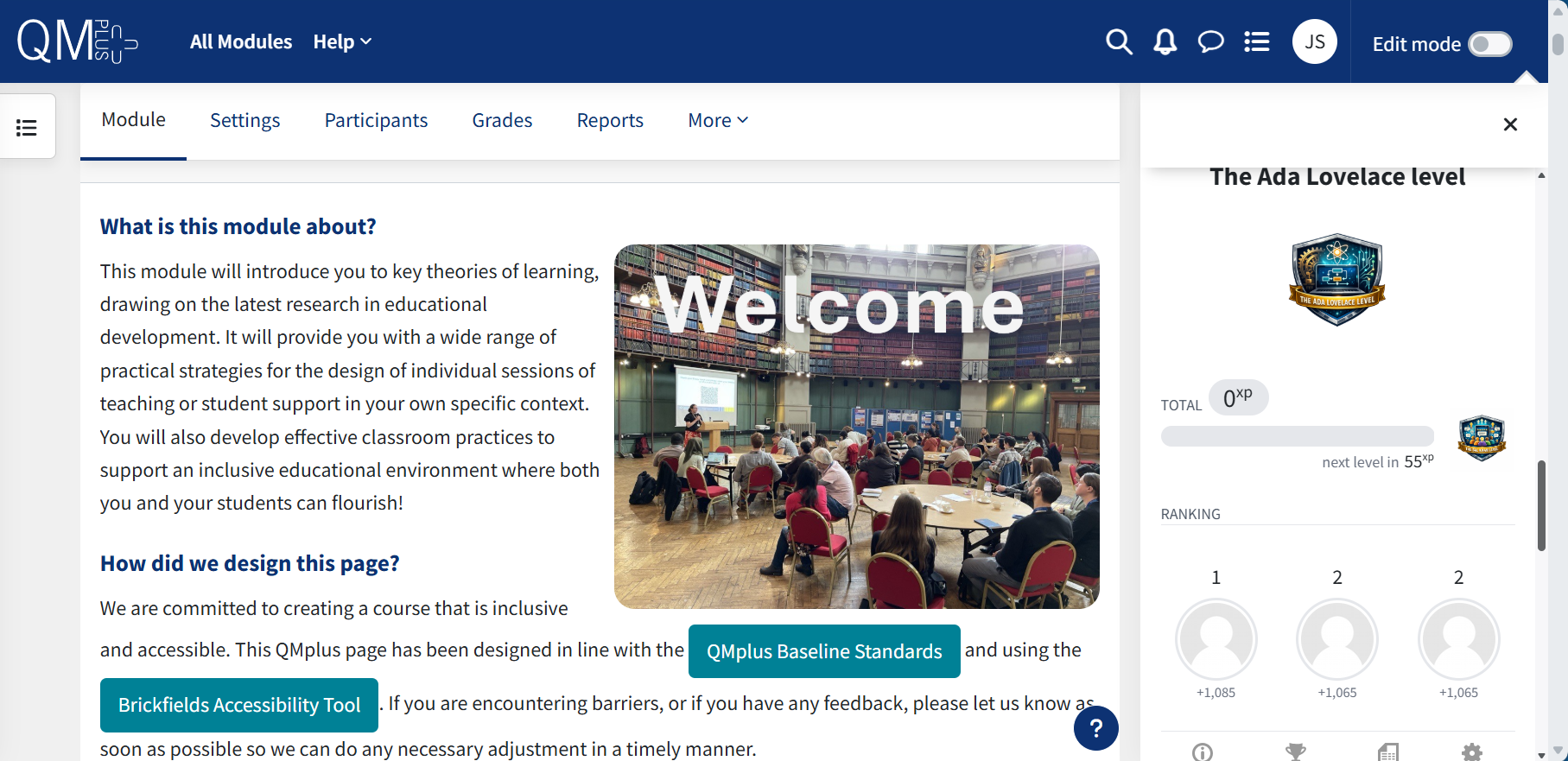
- Level Up plugin: This was highly engaging for students. Assigning names to levels and recognising top participants at the end of the semester added a motivational, game-like element. Many participants were interested in using this approach in their own teaching.
Learn more about Level Up (gamification) | MyQMUL
Advice for others
Valentina’s key advice is to focus on consistency and structure. Having a clear, repeatable weekly layout—such as learning outcomes, pre-, during, and post-session activities—helps students navigate the module with ease.
She also emphasised the importance of investing time in design. While it may be tempting to upload materials quickly, a well-designed QMplus space can significantly improve engagement, particularly for students balancing study with work and other commitments.
Final thoughts
Many thanks to Valentina for sharing her experience and insights. Her thoughtful approach demonstrates how effective design can support both engagement and learning outcomes.